 Bad
BadEntries at reaction zones
Fading or joining price at a marked momentum origin gives a defined location instead of chasing mid-range.
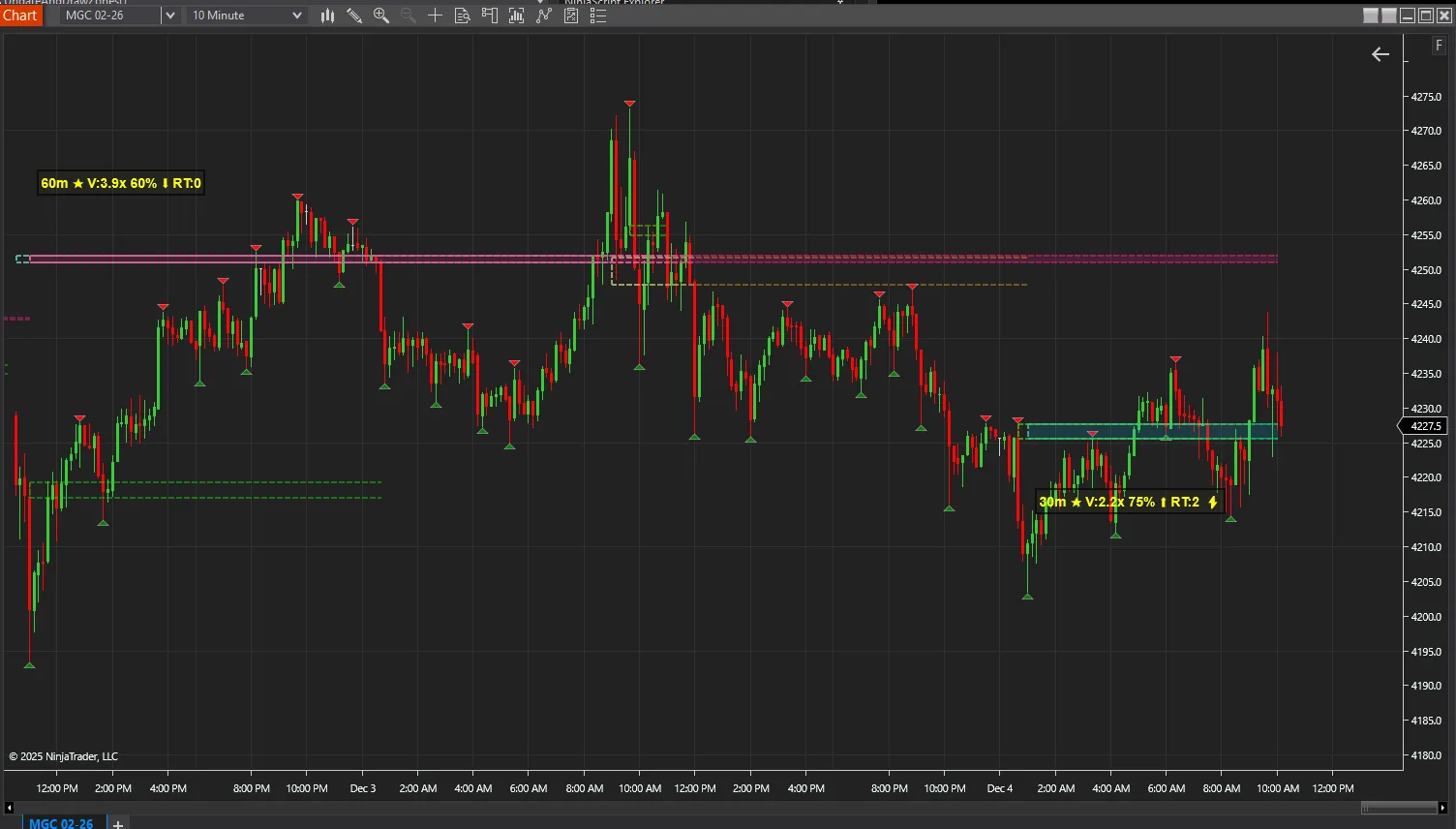
Identify high-momentum candles and visualize dynamic support/resistance zones around these hot bars.
BadBuddha's Zen Zones is a free tool from BadBuddha's Library — download it and drop it straight into NinjaTrader 8.
Download BadBuddha's Zen ZonesVersion 2.1.0.0 · Installs like every BadBuddha tool — see the install guide. Free tools need no activation.
Some candles matter more than others. A high-momentum bar — unusually large range, decisive close — records a moment when one side overwhelmed the other, and the area it launched from tends to stay relevant: price often reacts when it returns there. BadBuddha's Zen Zones finds those hot bars automatically and draws dynamic support and resistance zones around them.
Instead of hand-drawing boxes after every impulsive move, you get a chart where the origins of momentum are already mapped — zones to lean on for entries, targets, and risk placement.
Fading or joining price at a marked momentum origin gives a defined location instead of chasing mid-range.
Opposing zones ahead of price are natural places to take profit or tighten stops.
Stops placed beyond a zone are anchored to structure the market actually produced, not to an arbitrary tick count.
Same import as every NinjaTrader 8 add-on.
Use the download button above — no account, no checkout, no activation for free tools.
Control Center → Tools → Import → NinjaScript Add-On, then select the downloaded file. Do not unzip it first.
Open a chart → right-click → Indicators → find BadBuddha's Zen Zones in the list and configure it to taste.
BadBuddha tools include an update checker that tells you inside NinjaTrader when a new version ships.
Yes — BadBuddha's Zen Zones is part of BadBuddha's free library. There is no trial clock, no account, and no activation step; download it and use it.
Download the .zip, then in NinjaTrader 8 go to Control Center → Tools → Import → NinjaScript Add-On and select the file (don’t unzip it first). Full walkthrough in our Getting Started guide.
Yes. Chart indicators run locally inside your NinjaTrader 8 platform and work the same on sim, evaluation, and funded accounts regardless of broker or prop firm.
Every BadBuddha tool ships with a built-in update checker — when a new version is released, NinjaTrader lets you know and the download link on this page always serves the latest build.
Email info@badbuddhacustoms.com with the indicator name in the subject line. Questions, bug reports, and feature ideas are all welcome — free tools get real support too.
18 free and Pro indicators built for NinjaTrader 8.