 Bad
Bad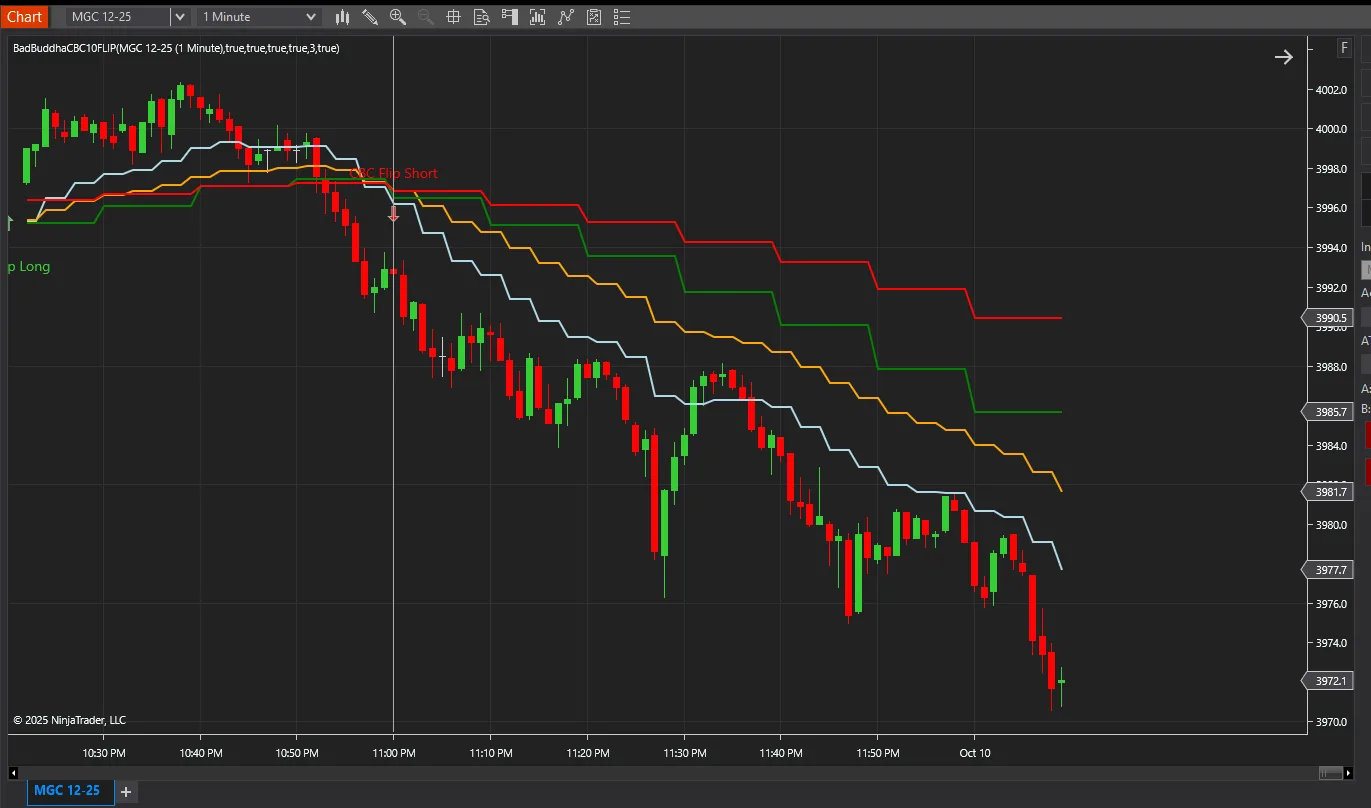
BadBuddha CBC 10FLIP MTF
FREE
Version 2.2.0.0 · Free tool — no signup required. See the install guide to get it on your chart.
Bring clarity to your trading with the CBC‑Flip MultiTime indicator for NinjaTrader 8. Designed to spot the shift in market sentiment on a higher timeframe while you trade on a lower one, CBC‑Flip is designed to highlight higher-timeframe trend flips while you execute on the lower one:
-
Instant Sentiment Signals
Green up‑arrows when 10‑minute candles confirm a bullish flip, red down‑arrows for bearish flips—right on your 1‑minute chart. -
Trend‑Focused Entries
Ride the bigger moves by only acting when the higher timeframe validates momentum. -
Seamless Multi‑Timeframe Integration
Automatically adds and syncs the larger bars, and alerts on every detected flip. -
Draws 10 Minute 9/20 EMA, Lower timeframe 9/20 EMA and visual flips all on the same chart.
-
Includes an automated alert when new versions are available.
Whether you’re a breakout hunter or trend follower, CBC‑Flip MultiTime delivers clean, unambiguous signals that help you stay aligned with the market’s directional bias. Add it to your toolkit and trade with confidence.
Install in Under a Minute
Same NinjaScript import as every NinjaTrader 8 add-on.
Download the .zip
Hit the download button above — no account or checkout for free tools.
Import into NinjaTrader 8
Control Center → Tools → Import → NinjaScript Add-On, then select the downloaded file. Don’t unzip it first.
Add it to a chart
Open a chart → right-click → Indicators (or the relevant menu) → add BadBuddha CBC 10FLIP MTF and configure it to taste.
Stay current
BadBuddha tools include an update checker that tells you inside NinjaTrader when a new version ships — and this page always serves the latest build.
BadBuddha CBC 10FLIP MTF FAQ
Is BadBuddha CBC 10FLIP MTF really free?
Yes — it's a free BadBuddha tool. No trial clock, no account, no activation; download it and use it.
How do I install BadBuddha CBC 10FLIP MTF?
Download the .zip, then in NinjaTrader 8 go to Control Center → Tools → Import → NinjaScript Add-On and select the file (don’t unzip it first). Full walkthrough in our Getting Started guide.
Does it work on prop-firm evaluation and funded accounts?
Yes. BadBuddha tools run locally inside your NinjaTrader 8 platform and work the same on sim, evaluation, and funded accounts regardless of broker or prop firm.
How do updates work?
Every BadBuddha tool ships with a built-in update checker — when a new version is released, NinjaTrader lets you know, and the download on this page always serves the current build.
Where do I get support?
Email info@badbuddhacustoms.com with "BadBuddha CBC 10FLIP MTF" in the subject line. Questions, bug reports, and feature ideas are all welcome.