 Bad
Bad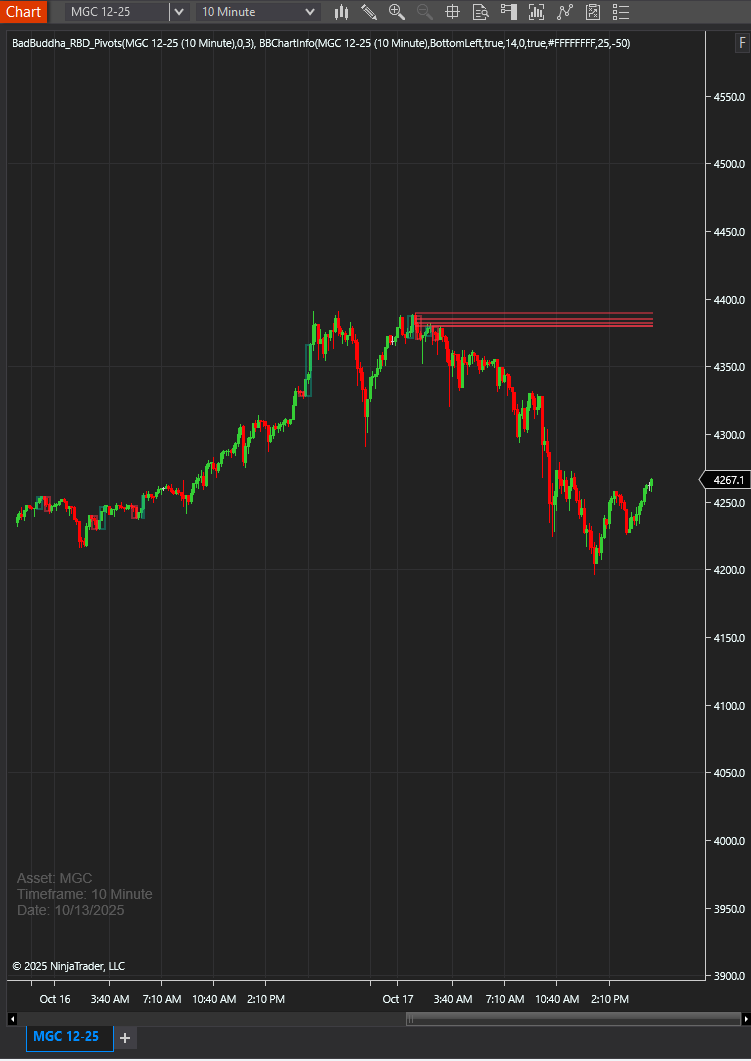
BadBuddha Chart Info Overlay
FREE
Version 1.2.1.0 · Free tool — no signup required. See the install guide to get it on your chart.
BadBUddha's ChartInfo is a lightweight NinjaTrader 8 indicator that displays essential chart information directly on the trading chart. Quickly identify the asset, timeframe, and current date without cluttering your workspace. Great for reviewing your trades from screen captures.
Features
Real-time Chart Information Display
- Asset/Instrument name
- Chart timeframe (e.g., Minute 5, Day 1)
- Current bar date
Fully Customizable Appearance
- Choose text color
- Adjustable opacity (0-100%)
- Font size control (8-48 pixels)
Flexible Positioning
- Four corner positions: TopLeft, TopRight, BottomLeft, BottomRight
- Fine-tune with horizontal and vertical offsets (-500 to +500 pixels)
Professional Features
- Automatic update checking
- NinjaTrader 8.1.6+ vendor licensing support
- Optimized SharpDX rendering
Install in Under a Minute
Same NinjaScript import as every NinjaTrader 8 add-on.
Download the .zip
Hit the download button above — no account or checkout for free tools.
Import into NinjaTrader 8
Control Center → Tools → Import → NinjaScript Add-On, then select the downloaded file. Don’t unzip it first.
Add it to a chart
Open a chart → right-click → Indicators (or the relevant menu) → add BadBuddha Chart Info Overlay and configure it to taste.
Stay current
BadBuddha tools include an update checker that tells you inside NinjaTrader when a new version ships — and this page always serves the latest build.
BadBuddha Chart Info Overlay FAQ
Is BadBuddha Chart Info Overlay really free?
Yes — it's a free BadBuddha tool. No trial clock, no account, no activation; download it and use it.
How do I install BadBuddha Chart Info Overlay?
Download the .zip, then in NinjaTrader 8 go to Control Center → Tools → Import → NinjaScript Add-On and select the file (don’t unzip it first). Full walkthrough in our Getting Started guide.
Does it work on prop-firm evaluation and funded accounts?
Yes. BadBuddha tools run locally inside your NinjaTrader 8 platform and work the same on sim, evaluation, and funded accounts regardless of broker or prop firm.
How do updates work?
Every BadBuddha tool ships with a built-in update checker — when a new version is released, NinjaTrader lets you know, and the download on this page always serves the current build.
Where do I get support?
Email info@badbuddhacustoms.com with "BadBuddha Chart Info Overlay" in the subject line. Questions, bug reports, and feature ideas are all welcome.