 Bad
Bad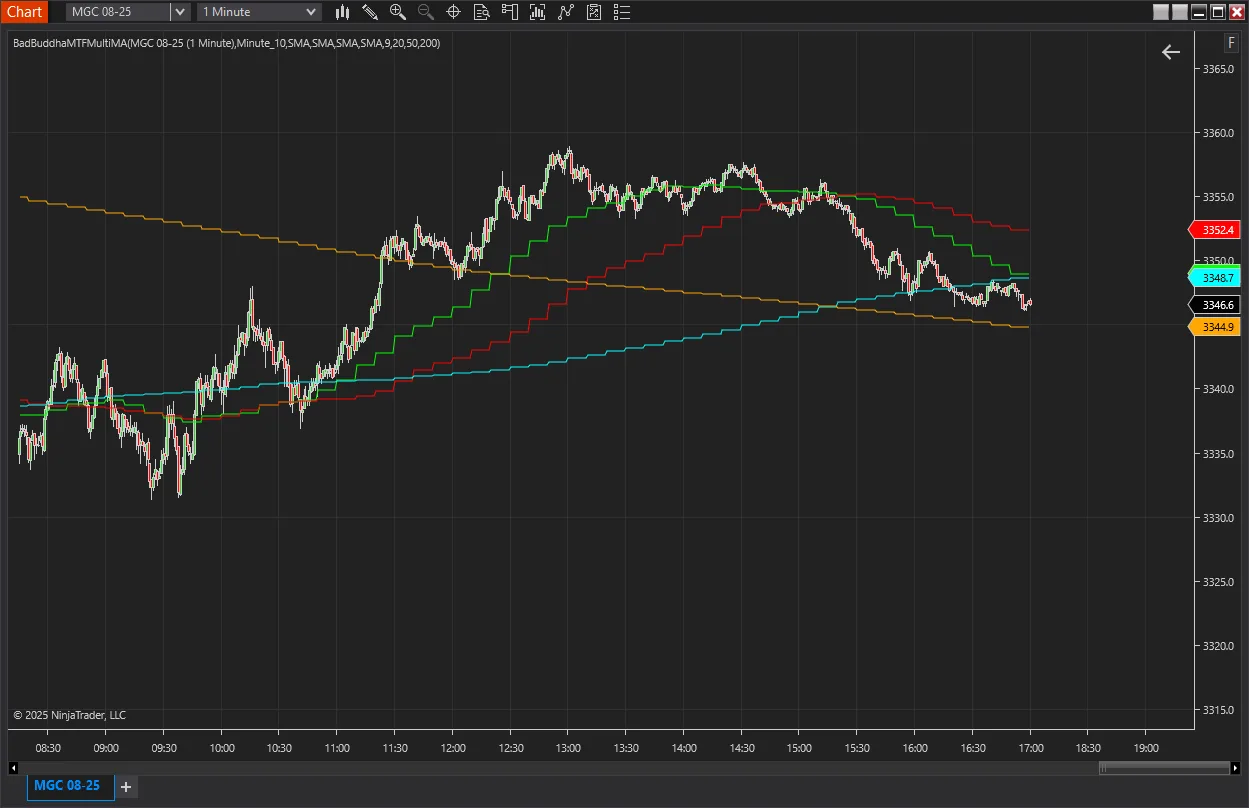
BadBuddha MTF Multi-MA
$10.00
✓ Payment received — thank you! Transaction ID:
Pro tools need activation: email your NinjaTrader User ID to support@badbuddhacustoms.com (see the Getting Started guide).
Something went wrong completing the payment. Please try again, or email info@badbuddhacustoms.com and we'll sort it out.
The PayPal checkout couldn't load — this is usually an ad or content blocker. Allow paypal.com and reload the page, or email info@badbuddhacustoms.com to order directly.
One-time purchase. All sales final per our No Returns Policy — try the free Lite version first.
The BadBuddha Customs MTF MA strips away the noise and gives you a sharp, layered view of market structure. See moving averages from multiple timeframes, bar types, and average types—all stacked in one clean chart. No flipping between charts. No second-guessing. Just clear momentum and directional bias, right where you need it.
Trend Confirmation Across Timeframes
- Get clarity fast. When short, mid, and long-term MAs stack in the same direction, it’s a green light for momentum and direction. No more second-guessing trend strength.
Precision Entry with Big-Picture Context
- Use fast MAs on lower timeframes for well-timed entries anchored to the broader trend. Perfect for catching pullbacks with conviction, not confusion. Helps filter setups that go against the dominant move.
One Chart, Smarter Decisions, Full Perspective
- Ditch the chart-hopping. The MTF MA layout gives you the full story in one clean view—less clutter, clearer decisions, better flow.
From Checkout to Chart
Same NinjaScript import as every NinjaTrader 8 add-on.
Purchase & download
Complete the PayPal checkout above; the download button appears right on this page after payment.
Import into NinjaTrader 8
Control Center → Tools → Import → NinjaScript Add-On, then select the downloaded file. Don’t unzip it first.
Activate
Email your NinjaTrader User ID (and PayPal transaction ID) to info@badbuddhacustoms.com — activation is tied to your NinjaTrader user, not a machine. Details in the Getting Started guide.
Stay current
BadBuddha tools include an update checker that tells you inside NinjaTrader when a new version ships — and this page always serves the latest build.
BadBuddha MTF Multi-MA FAQ
How much does BadBuddha MTF Multi-MA cost?
$10.00 as a one-time purchase — there is no subscription or renewal. Checkout is via PayPal and accepts PayPal balance, Pay Later, and debit or credit cards.
How do I install BadBuddha MTF Multi-MA?
Download the .zip, then in NinjaTrader 8 go to Control Center → Tools → Import → NinjaScript Add-On and select the file (don’t unzip it first). Full walkthrough in our Getting Started guide.
What is the refund policy?
All sales are final, per our No Returns Policy — digital tools can’t be returned. That is exactly why free Lite editions exist: try before you buy.
How do updates work?
Every BadBuddha tool ships with a built-in update checker — when a new version is released, NinjaTrader lets you know, and the download on this page always serves the current build.
Where do I get support?
Email info@badbuddhacustoms.com with "BadBuddha MTF Multi-MA" in the subject line. Questions, bug reports, and feature ideas are all welcome.