 Bad
Bad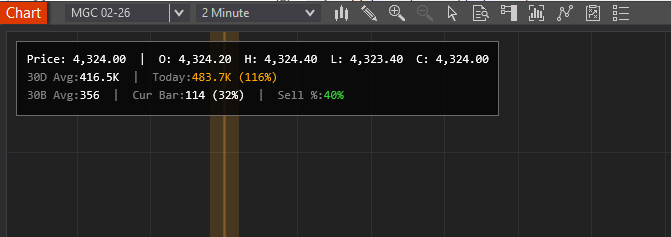
BadBuddha's Enhanced Volume Label (Lite)
FREE
Version 1.3.1.0 · Free tool — no signup required. See the install guide to get it on your chart.
VolumeStatsLabel displays critical volume metrics in a sleek, customizable panel directly on your NinjaTrader 8 chart. Instantly see how today's volume compares to the 30-day average, identify unusual volume spikes with color-coded alerts, and gauge buying vs. selling pressure in real-time. No more switching between windows or manually calculating volume ratios - everything you need is right there on your chart, updated tick-by-tick.
Install in Under a Minute
Same NinjaScript import as every NinjaTrader 8 add-on.
Download the .zip
Hit the download button above — no account or checkout for free tools.
Import into NinjaTrader 8
Control Center → Tools → Import → NinjaScript Add-On, then select the downloaded file. Don’t unzip it first.
Add it to a chart
Open a chart → right-click → Indicators (or the relevant menu) → add BadBuddha's Enhanced Volume Label (Lite) and configure it to taste.
Stay current
BadBuddha tools include an update checker that tells you inside NinjaTrader when a new version ships — and this page always serves the latest build.
BadBuddha's Enhanced Volume Label (Lite) FAQ
Is BadBuddha's Enhanced Volume Label (Lite) really free?
Yes — it's a free BadBuddha tool. No trial clock, no account, no activation; download it and use it.
How do I install BadBuddha's Enhanced Volume Label (Lite)?
Download the .zip, then in NinjaTrader 8 go to Control Center → Tools → Import → NinjaScript Add-On and select the file (don’t unzip it first). Full walkthrough in our Getting Started guide.
Does it work on prop-firm evaluation and funded accounts?
Yes. BadBuddha tools run locally inside your NinjaTrader 8 platform and work the same on sim, evaluation, and funded accounts regardless of broker or prop firm.
How do updates work?
Every BadBuddha tool ships with a built-in update checker — when a new version is released, NinjaTrader lets you know, and the download on this page always serves the current build.
Where do I get support?
Email info@badbuddhacustoms.com with "BadBuddha's Enhanced Volume Label (Lite)" in the subject line. Questions, bug reports, and feature ideas are all welcome.