 Bad
Bad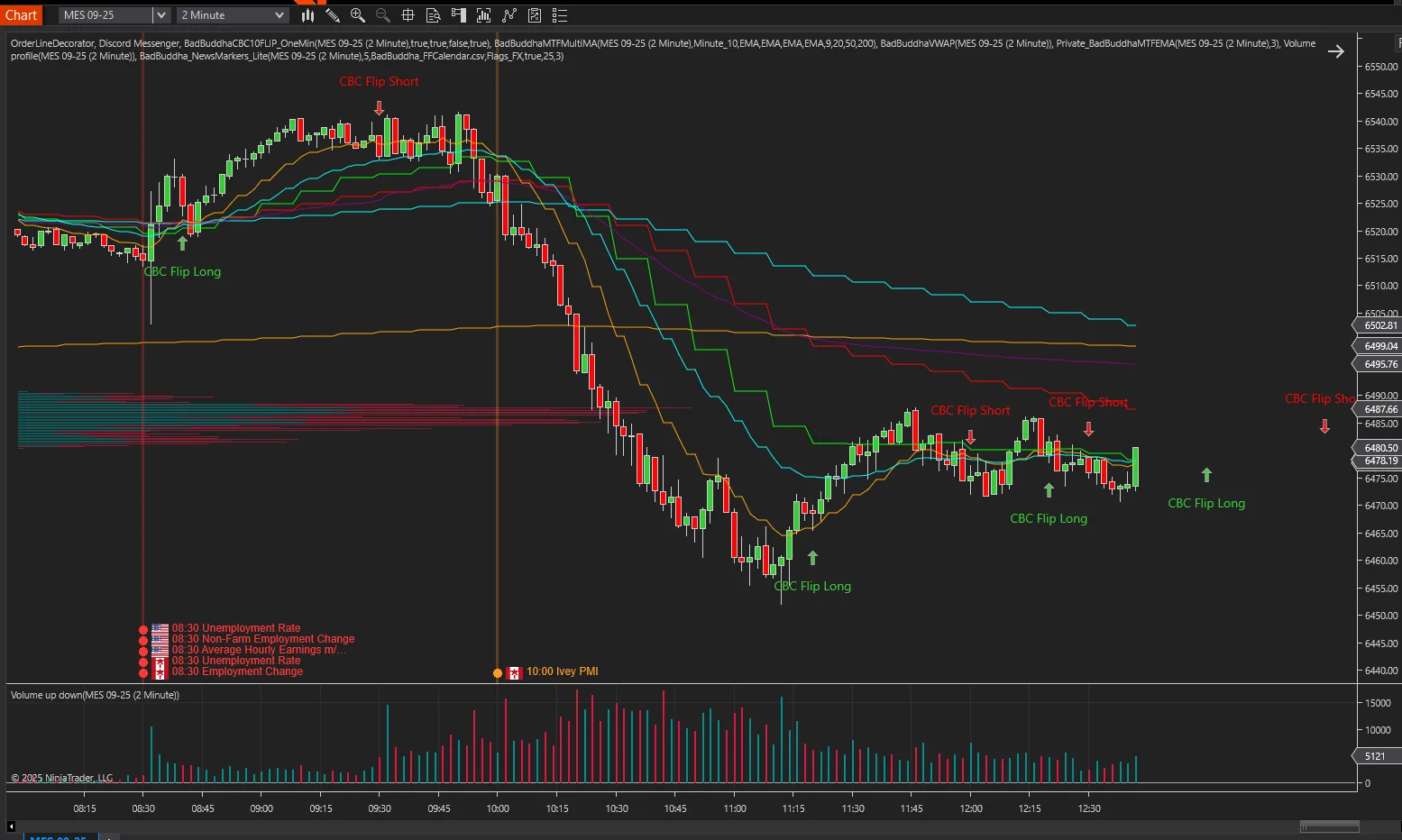
BadBuddha's News Tools Lite Pack for NinjaTrader® 8
FREE
Need the full feature set? Upgrade to BadBuddha's News Tools Pro for NinjaTrader® 8 — $158
Version 2.6.1.0 · Free tool — no signup required. See the install guide to get it on your chart.
News Tools Lite Pack for NinjaTrader® 8
See today’s market-moving headlines right on your chart — and fetch them in one click.
What’s in the pack
-
News Markers Lite (Indicator) — Plots today’s High (red) and Medium (orange) impact events at the exact minute on any intraday chart. Shows the country flag and an optional vertical guide line you can toggle.
-
News Downloader Lite (Utility Indicator) — Grabs the latest calendar and saves it to your NinjaTrader Documents folder for the Markers to use. No browser, no copy-paste.
-
Update alerting service
Why traders like it
-
Trade the chart, not a calendar tab — Flags + colors tell you what’s coming at a glance.
-
Clean by design — Today only, High/Medium only. Zero visual clutter.
-
One-click updates — Pull fresh data from inside NinjaTrader.
-
Lightweight & smooth — Optimized for Minute/Second/Tick/Renko.
How it works (quick)
-
Import the Lite Pack (.zip) into NinjaTrader: Tools → Import → NinjaScript Add-On.
-
Drop the included flag PNGs into Documents\NinjaTrader 8\Flags_FX.
-
Apply News Downloader Lite to any chart and press Download (or your update button).
-
Apply News Markers Lite to your intraday chart.
-
(Optional) Toggle “Show Vertical Line” if you want a guide line at each event time.
Key features (Lite)
-
High/Medium events only (red/orange)
-
Country flags rendered at event time
-
Vertical guide line (on/off toggle)
-
Local time conversion (no manual offsets)
-
Intraday only (Minute/Second/Tick/Renko)
What’s intentionally limited
-
Today’s session only (no historical plotting)
-
No low/holiday filters or advanced styling
-
Minimal settings for speed and simplicity
Requirements
-
NinjaTrader 8 (Windows 10/11, 64-bit)
-
Intraday data series
-
Read/write access to Documents\NinjaTrader 8
Troubleshooting quickies
-
Flags not showing? Confirm PNG names (e.g., US.png, EU.png, GB.png) live in Documents\NinjaTrader 8\Flags_FX.
-
No events plotting? Run News Downloader Lite first to refresh the CSV; ensure your chart is intraday.
-
Times look off? Verify your Windows time zone and that “Convert CSV Time → Local” is on.
Install in Under a Minute
Same NinjaScript import as every NinjaTrader 8 add-on.
Download the .zip
Hit the download button above — no account or checkout for free tools.
Import into NinjaTrader 8
Control Center → Tools → Import → NinjaScript Add-On, then select the downloaded file. Don’t unzip it first.
Add it to a chart
Open a chart → right-click → Indicators (or the relevant menu) → add BadBuddha's News Tools Lite Pack for NinjaTrader® 8 and configure it to taste.
Stay current
BadBuddha tools include an update checker that tells you inside NinjaTrader when a new version ships — and this page always serves the latest build.
BadBuddha's News Tools Lite Pack for NinjaTrader® 8 FAQ
Is BadBuddha's News Tools Lite Pack for NinjaTrader® 8 really free?
Yes — it's a free BadBuddha tool. No trial clock, no account, no activation; download it and use it.
How do I install BadBuddha's News Tools Lite Pack for NinjaTrader® 8?
Download the .zip, then in NinjaTrader 8 go to Control Center → Tools → Import → NinjaScript Add-On and select the file (don’t unzip it first). Full walkthrough in our Getting Started guide.
What does BadBuddha's News Tools Pro for NinjaTrader® 8 add?
BadBuddha's News Tools Lite Pack for NinjaTrader® 8 is the free edition of the same tool — the full feature breakdown is on the BadBuddha's News Tools Pro for NinjaTrader® 8 page ($158.00, one-time). Both install the same way, so trying Lite first costs nothing.
Does it work on prop-firm evaluation and funded accounts?
Yes. BadBuddha tools run locally inside your NinjaTrader 8 platform and work the same on sim, evaluation, and funded accounts regardless of broker or prop firm.
How do updates work?
Every BadBuddha tool ships with a built-in update checker — when a new version is released, NinjaTrader lets you know, and the download on this page always serves the current build.
Where do I get support?
Email info@badbuddhacustoms.com with "BadBuddha's News Tools Lite Pack for NinjaTrader® 8" in the subject line. Questions, bug reports, and feature ideas are all welcome.